







AI search optimization starts with a website that AI tools can reach, understand, and trust. At WebXd, our team brings 35+ of combined industry experience to digital marketing, including SEO, AEO, and GEO. Start with three basics: let the right crawlers in, keep key pages indexed, and answer real customer questions with specific facts and first-hand experience your business can share.
However, no one can guarantee that ChatGPT, Perplexity, or Gemini will mention your business. What you can control is whether your site is easy to find, easy to understand, and worth citing. Start with your most important service pages, then work through the steps below.
Table of Contents
What Is AI Search Optimization?
AI search optimization, sometimes called AI search engine optimization, is the work of helping your business show up accurately in answers from AI tools. Those tools include ChatGPT, Perplexity, Gemini, and Google's AI Overviews and AI Mode. You'll also see this work called AEO or GEO:
- Answer engine optimization (AEO) focuses on giving clear, direct answers to the questions people ask.
- Generative engine optimization (GEO) focuses on making your content a useful source when an AI tool writes a response.
The two approaches overlap in many ways, and both build on traditional search engine optimization (SEO). Google takes the same view. Its guide to optimizing for generative AI search says that, from Google's perspective, optimizing for AI search is still SEO.
It also helps to keep the possible outcomes separate. A brand mention is when an AI tool names your business. A citation is a link to your page that the tool shows as a source. A referral visit happens when someone clicks that link to your site. None of these means the answer recommended you, and none of them, on its own, means you gained a customer.
How Do AI Search Engines Find and Recommend Websites?
Many AI search tools work in a similar way. A crawler (an automated program, also called a bot) visits your pages and stores what it finds in a searchable database called an index. When someone asks a question, the system pulls pages that seem to answer it and uses them to ground its response. Many tools then link to some of those pages, which is how AI search sends visitors to your site.
Google's AI features may also run several related searches at once. For example, a question about fixing a weedy lawn might also trigger searches about weed killers and natural weed removal. For AI Overviews and AI Mode, a page must be indexed and eligible to appear in Search with a snippet.
Still, the platforms differ. Some rely on search indexes, while others can fetch pages in response to a user's question, and none of them publishes its full formula. Not every answer comes from a live search, either. Some rely on what a model learned during training, which is why OpenAI and Google offer separate controls for training and search.
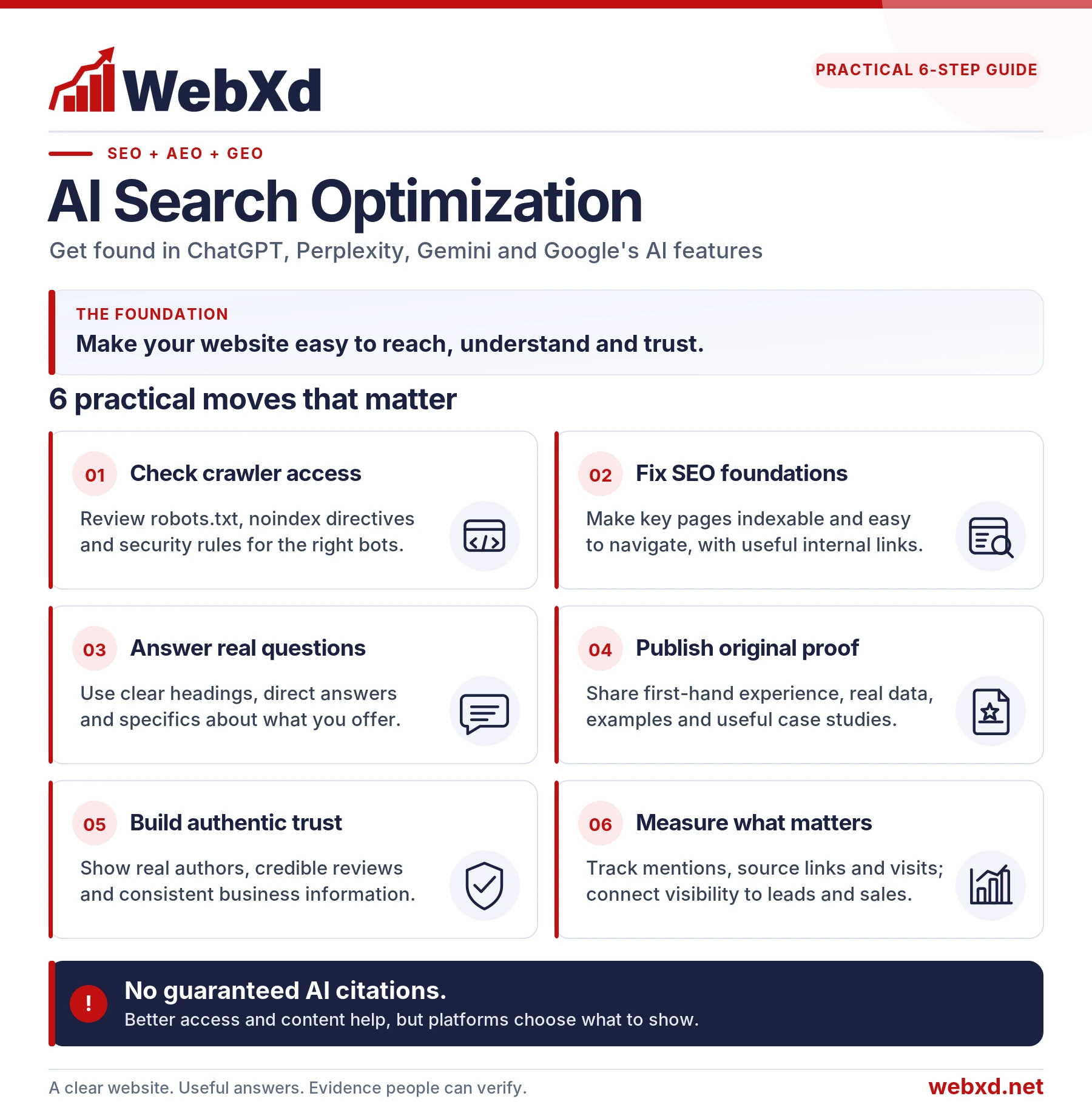
How to Optimize Your Website for AI Search
Start with Step 1 to rule out access problems before improving your content.
Step 1: Make Sure AI Search Tools Can Access Your Website
Your robots.txt file (at yourdomain.com/robots.txt) tells crawlers which parts of your site they can visit. The main AI search crawlers are OAI-SearchBot for ChatGPT search, PerplexityBot for Perplexity, and Googlebot for Google Search, including AI Overviews and AI Mode. OpenAI's separate GPTBot collects content that may be used to train its models.
OpenAI's crawler documentation says these settings work independently, so you can stay in ChatGPT search while opting out of training:
# Block OpenAI model training
User-agent: GPTBot
Disallow: /

# All other crawlers, including OAI-SearchBot and PerplexityBot
User-agent: *
Disallow: /admin/

Sitemap: https://www.example.com/sitemap.xml
Here, GPTBot is blocked and every other crawler can visit everything except the admin area. A crawler with its own group ignores the general rules, so repeat any Disallow lines it still needs. Blocking GPTBot is optional; it's a business decision about training, not search.
This example is for illustration. Ask your developer to preserve your site's existing rules before making changes. A robots.txt file does not secure private pages. Blocking a crawler doesn't stop anyone with the link from opening a page.
Next, run these quick checks:
- Open your robots.txt file. Look for a line that says only "Disallow: /" under User-agent: *, OAI-SearchBot, PerplexityBot, Googlebot, or Bingbot. That line blocks the entire site.
- In Google Search Console, use the URL Inspection tool to confirm your key pages are indexed. Then run a live test to check whether Google can access each page right now.
- Check your key pages for noindex directives, which keep a page out of search results, including AI Overviews and AI Mode. These may appear in the HTML or an HTTP response header. Use the URL Inspection tool to see whether Google has detected a directive that prevents indexing.
- In Search Console, go to Settings and open the Search generative AI control. Including your site is the default. If someone chose to exclude it, your pages won't appear in AI Overviews or AI Mode.
- Ask your developer or host whether a firewall or bot protection tool blocks AI crawlers. These tools can block crawlers even when robots.txt allows them.
Finally, make sure your important text appears in the page's HTML. Google can read content loaded with JavaScript, but AI crawlers may not. Live tests showed AI bots acting like simple text fetchers. To check a page, turn off JavaScript in your browser and reload it. Anything that disappears may be invisible to AI tools.
Clear internal links and consistent canonical tags (which tell search engines the main version of a page) also help crawlers find the right pages.
Step 2: Strengthen Your Website's SEO
AI search doesn't replace SEO. It depends on it. Google says its AI features are rooted in its core Search ranking and quality systems.
That's why we recommend fixing the basics first:
- Match each page to search intent, meaning what the searcher is trying to do.
- Keep your site structure logical, with important pages a few clicks from the homepage.
- Link related pages to each other.
- Write clear, descriptive page titles and headings.
- Make pages fast, mobile-friendly, and easy to use with a screen reader.
Structured data, also called schema markup, belongs on this list too. It's code that helps search engines understand details like your business name, hours, products, and article authors. Make sure it matches what visitors can see, and test it with Google's Rich Results Test. Google says no special schema is needed for its AI features, and no markup guarantees a citation, but schema can help pages qualify for rich results such as review stars.
If your site has indexing problems, duplicate pages, or slow templates, start there. Solid technical and on-page SEO helps in regular search results, and it gives AI tools better pages to work with.
Step 3: Answer the Questions Your Customers Ask
Start by listing the questions customers actually ask. Good sources include sales calls, support emails, reviews, and the search queries in Google Search Console. Then group the questions by the decision they help someone make, such as cost, timing, or fit.
When we build a question list for clients, we start with sales conversations and support themes, then add search research. For one client, we also built lead magnets that answer the questions customers ask most.
Next, give each important question a clear home. Use a heading that matches the question, and answer it in the first sentence or two. Add details, conditions, and limits right after the answer, and use a comparison table when it helps. A planned content strategy can help you decide which questions need their own page and which belong together.
The more complete your site is, the more questions it can answer. AI tools often break one question into several smaller searches, and every accurate detail you publish is another chance to match one of them. That includes your services, pricing, service areas, process, credentials, and policies. No one can see exactly what each AI tool uses, and answers vary from person to person, but thorough information improves your odds. The goal is completeness, not volume: add real details customers want, not filler or near-duplicate pages.
Here's a made-up example for a property management company.
Before:
Our Services
We provide best-in-class property management solutions tailored to your unique needs. Our dedicated team is committed to maximizing your investment and delivering peace of mind.
After:
How Much Does Property Management Cost?
Our management fee is 8% of the rent we collect each month. It covers rent collection, maintenance coordination, and monthly owner statements. When we place a new tenant, we charge a one-time leasing fee of half of one month's rent. There's no management fee while a home is vacant.
The first version could describe almost any company. The second answers a real question in its first sentence, gives specific numbers, and explains the conditions. A visitor can make a decision from it, and an AI tool can pull out a clear, accurate answer.
Step 4: Publish Original Content and Keep It Current
Many websites repeat the same general advice. If your page says what dozens of other pages say, an AI tool has little reason to choose yours. Google's guidance contrasts "commodity content," which restates common knowledge, with content that offers a unique, first-hand point of view.
Original information can include:
- Data from your own work, such as typical project timelines or your most common customer questions
- Real examples, case studies, and before-and-after photos
- Insights from your team's experts, with their names and roles
- Plain-English explanations of local rules, costs, or processes you handle every day
You don't need a research department to publish original content. A short page built on what your team knows is often more useful than a long article that summarizes everyone else.
For one of our clients, a doctor-founded skincare brand, we added 34 new pages built on the brand's own expertise, including treatment comparisons and clinical results. Those pages went on to account for 65% of the site's appearances in Google search.
Original content also has to stay accurate. Outdated pages cost you trust, and AI tools may repeat old details, like last year's prices or a service you no longer offer. Review a page whenever something on it changes, such as pricing, services, staff, regulations, or statistics. Don't change a publication date unless you've made a real update, and give each key page an owner who keeps its facts current.
Updating can also mean removing. In our work with a property management company, much of the existing blog was outdated, repetitive, or out of step with what people were searching for. As part of an ongoing SEO, AEO, and GEO strategy, we refreshed, combined, or redirected those pages. Together with a site redesign, that work helped SJA grow leads 41.6% from January through June 2026, compared with the same months in 2025. These results reflect the combined website and SEO work, not a separate measurement of AI search leads.
Step 5: Show Your Expertise and Earn Trusted Mentions
E-E-A-T stands for experience, expertise, authoritativeness, and trustworthiness. The term comes from the guidelines Google gives its search quality raters. It isn't a single setting or score. Instead, it describes the kind of content Google's systems aim to reward: helpful, reliable information from people who know the subject.
On a business website, trust signals are practical:
- An About page that explains who you are and how long you've been in business
- Author names and bios that show real experience and credentials
- An easy-to-find address, phone number, and contact form
- Claims backed by sources, data, or examples
Credibility also comes from beyond your own site. AI answers may draw on reviews, directories, news stories, industry sites, and forum discussions, so your reputation across the web can shape what an AI tool says about you.
Focus on real, earned visibility. That includes relevant backlinks, local news coverage, awards, association memberships, expert quotes in industry publications, and original research that others want to cite.
Consistency matters, too. In our AEO and GEO work, we keep a list of each client's key business details, including services, hours, and service areas. Then we compare that list with their profiles and directory listings and flag conflicts to fix. Finally, skip the shortcuts. Google says chasing inauthentic mentions isn't as helpful as it might seem, because its AI features depend on the same systems that filter out spam.
Check what AI tools say about your business, too. At BrightonSEO Conference, speaker Damian Rollison of SOCi reported that 67% of consumers have gotten wrong AI information about a local business. An easy test is to ask ChatGPT what it knows about your business and see whether it gets you right. If it doesn't, find the page or listing that may be feeding it and correct it.
How to Optimize for ChatGPT, Perplexity and Gemini
The steps above apply to every platform, but each one uses its own controls. Here's how they compare:
| Platform | What it is | What to check | Where to track it |
|---|---|---|---|
| ChatGPT search | Web search inside ChatGPT, with links to sources | Allow OAI-SearchBot (GPTBot is only for training) | Visits from chatgpt.com in GA4 |
| Perplexity | An answer engine that lists its sources | Allow PerplexityBot | Visits from perplexity.ai in GA4 |
| Google AI Overviews | AI summaries at the top of some Google results | Googlebot access and the Search generative AI setting | Generative AI report in Search Console |
| Google AI Mode | A chat-style mode inside Google Search | Googlebot access and the Search generative AI setting | Generative AI report in Search Console |
| Gemini app | Google's AI assistant | Google-Extended, a setting (not a crawler) for training and grounding uses | Visits from gemini.google.com in GA4 |
| Microsoft Copilot | Microsoft's AI assistant | Allow Bingbot, Bing's crawler | AI Performance report in Bing Webmaster Tools |
ChatGPT SEO
If your firewall filters bots, allow OpenAI's published IP addresses along with OAI-SearchBot. OpenAI says sites that block OAI-SearchBot won't be shown in ChatGPT search answers, though they may still appear as basic links to the site.
ChatGPT-User is different. It visits a page only when a person asks ChatGPT to look at it. OpenAI says robots.txt rules may not apply to these visits, and this agent doesn't decide what appears in search.
Perplexity SEO
According to Perplexity's crawler documentation, PerplexityBot isn't used to train AI models. A second agent, Perplexity-User, visits pages when a person asks it to, and Perplexity says it generally ignores robots.txt.
Beyond access, Perplexity doesn't publish a citation formula.
Gemini and Google AI Search Optimization
Google runs three AI experiences that are easy to confuse. AI Overviews and AI Mode are part of Google Search, and AI Overviews only appear when Google decides they add value. Gemini is a separate assistant app that can use Google Search to support its answers.
Local businesses and online stores should keep their Google Business Profile and Merchant Center details accurate, since Google's AI responses can include that information.
Gemini adds one more control. The Google-Extended setting lets you choose whether Google can use your content to train Gemini models and to support (or "ground") answers in the Gemini app. Blocking Google-Extended does not affect your inclusion or rankings in Google Search. It only limits the Gemini training and grounding uses that the setting covers.
How to Measure AI Search Visibility
Measuring AI search comes down to three questions. Are you appearing? Are people visiting? Are those visits helping your business? No single report answers all three, and AI answers vary by platform, wording, location, time, and whether someone is signed in. That's why we recommend combining several sources:
- Google Search Console now includes a Generative AI performance report. It shows how often links to your site appeared in AI Overviews and AI Mode, and you can sort the numbers by page, country, and device. It doesn't cover ChatGPT, Perplexity, or other tools.
- Bing Webmaster Tools offers an AI Performance report that shows how often Microsoft Copilot, Bing's AI summaries, and some partner tools cite your site. It also lists which pages get cited and some of the search phrases the AI used. It counts citations, not clicks.
- Google Analytics 4 (GA4) added an AI Assistant channel in May 2026. It groups visits from known AI assistants, such as ChatGPT and Gemini, when GA4 can tell where a visit came from. When it can't, the visit may be counted under another channel, so this one won't catch every visitor who used an AI tool. Clicks from AI Overviews and AI Mode count as regular organic search traffic.
- Manual prompt testing shows what customers actually see and catches factual errors that reports miss.
- AI visibility tools can test many questions automatically and track changes over time. Treat their numbers as estimates, not complete counts.
When we review AI answers for clients, we record the exact prompt, platform, date, and location. We also note whether the answer mentions the business, cites a page, and gets the facts right.
A Simple Monthly Tracking Example
Here's a starter routine a small business can manage each month:
- Pick 10 priority questions that reflect real buying decisions. Include some that name your business and some that don't, such as "best [your business type] in [your city]."
- Choose the three platforms your customers are most likely to use, such as ChatGPT, Claude, and Google's AI Overviews or AI Mode.
- On the first business day of the month, ask each question once in a fresh chat, using the same wording and location each time. That's 30 answers to review.
- Rerun any answers that are important or look inconsistent, since responses can change between runs.
- Record the results in a sheet like the one below, and add the month's numbers from GA4, Search Console, and Bing Webmaster Tools.
- Note any content changes you made, and look for trends over several months.
Once the routine feels easy, add more questions or platforms as time allows.
| Date | Platform | Question | Brand mentioned? | Page cited? | Facts correct? | Next step |
|---|---|---|---|---|---|---|
| Nov 2 | ChatGPT | How much does property management cost in [city]? | Yes | No | No, shows an old fee | Update the pricing page |
| Nov 2 | Claude | How much does property management cost in [city]? | Yes | Yes, pricing page | Yes | None |
| Nov 2 | Google AI Mode | Best property manager in [city] for single-family homes | No | No | Not mentioned | Strengthen the service page |
The rows above are sample entries. Treat your own results as a sample too, not as your share of the whole market.
Your customers can also fill gaps your reports miss. Add a "How did you hear about us?" field to your forms. Thomas Peham of OtterlyAI shared that analytics credited Claude with 0.1% of the company's conversions, but 10.6% of customers said that's how they found it.
Above all, connect visibility to results. Citations and mentions are useful signals, but the real goal is more qualified leads and sales. Track form submissions, calls, and booked appointments in GA4, and compare them with your sales records or CRM when you can. If the numbers don't line up, marketing analytics and attribution work can help close the gaps.
Common AI Search Optimization Myths and Mistakes
Plenty of AI search advice isn't backed by evidence. Here are common myths and what the official documentation actually says.
- "You need an llms.txt file." An llms.txt file is a proposed way to give AI tools a summary of your site. Google says Google Search ignores these files, so they neither help nor hurt there. OpenAI's and Perplexity's crawler documentation doesn't list them as a visibility factor either.
- "Schema markup gets you cited." As Step 2 explains, schema helps search engines read a page but doesn't guarantee a citation.
- "If crawlers can get in, you'll be cited." Access only makes you eligible. Google says even pages that meet every requirement aren't guaranteed to be crawled, indexed, or shown.
- "More AI-generated pages means more visibility." Mass-producing pages for every possible question, just to manipulate results, can violate Google's scaled content abuse policy.
- "You have to chop content into small chunks." Google says there's no need to break content into tiny pieces or write in a special style for AI. Write clearly for people.
- "A citation means the AI recommended you." Being used as a source doesn't mean the answer tells people to choose you, so read the text around the link.
- "Someone can guarantee you a citation in ChatGPT." No agency or tool controls which sources AI tools cite, and Google warns that no third-party tool has access to its internal systems.
AI Search Optimization Checklist
Use this list to start improving your site today:
- Allow OAI-SearchBot, PerplexityBot, Googlebot, and Bingbot in robots.txt and your firewall
- Decide separately whether to block GPTBot from model training
- Confirm key pages are indexed, free of noindex directives, and listed in your XML sitemap
- Check that Search Console's Search generative AI setting includes your site
- List your 10 priority customer questions and answer each under a clear heading
- Publish complete, original details: services, pricing, service areas, process, your own data, and expert input
- Show who's behind the site with author bios, contact details, and a strong About page
- Validate your structured data and make sure it matches the page
- Match your business facts across your site, profiles, and directories
- Start a monthly AI visibility log, and measure leads, not just traffic
Frequently Asked Questions
What is the difference between SEO and AI search optimization?
SEO helps your pages rank in search results. AI search optimization helps your business appear accurately in AI-generated answers. The two overlap heavily, because most AI tools rely on crawled and indexed web pages, so strong SEO is the foundation.
How can I get my website found by ChatGPT?
Allow OAI-SearchBot in robots.txt and your firewall, then publish clear, specific answers to customer questions. That makes you eligible for ChatGPT search, though it doesn't guarantee a mention.
How do I get my website cited in Perplexity?
Allow PerplexityBot, keep your pages indexable, and fill them with specific, accurate, well-sourced information. Perplexity doesn't publish a citation formula, so aim to be the most useful source on your topic.
Do I need an llms.txt file?
No. Google Search ignores llms.txt files, and adding one shouldn't come before the basics in this guide.
How long does AI search optimization take?
Some fixes work quickly. OpenAI and Perplexity say their systems can take up to about 24 hours to reflect robots.txt changes. Changes to content and authority can take longer to show results, and there's no guaranteed timeline. Review your progress each month and look for trends over several months.
Get Your Website Ready for AI Search
AI search optimization isn't a bag of tricks. It's strong SEO with a sharper focus on clear answers, original information, and trust. First, make sure AI tools can reach your site. Next, answer your customers' real questions better than anyone else. Then track your progress each month, and judge it by leads and sales.
If you'd like a partner for that work, our AI search optimization services start with the questions your customers ask and the pages that should answer them. From there, we review crawler access, improve your key pages, and keep a clear record of how AI tools describe your business.